

The easy guide to getting back your Google storage without spending a penny

If, like a huge number of freelancers, you rely on the Google ecosystem to run your business—things like Drive for client files, Gmail for sending contracts and invoices, Photos for project assets—you’ve almost certainly encountered their standard 15GB storage ceiling. It sounds like a reasonable amount of space, but nowadays, 15GB is nothing. Google is counting on you reaching for your wallet when you hit the limit but you don’t have to. Before you hand over a monthly fee, spend fifteen minutes doing a bit of your own digital housekeeping. You probably have a lot more recoverable space than you think.
Find out what’s actually hogging all your storage
Your first move is to open Google One’s storage manager and look at the breakdown by service. To find the breakdown, click the Storage icon on your dashboard.
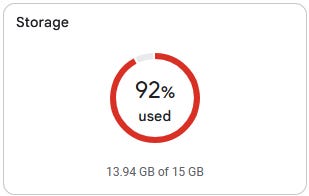
Most of us instinctively blame Gmail—given that it’s such a terrible email client, but more about that in another article—but the real culprits are usually Drive or Photos, which together will easily account for 70–80% of the problem for most people.
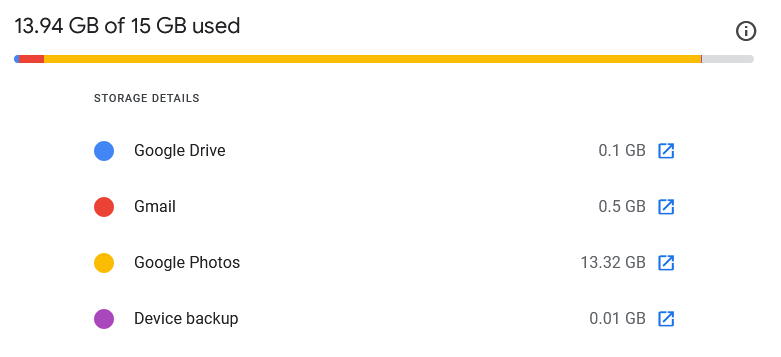
Such a simple step allows you to start fixing the right things first, and stops you wasting time in the wrong place, wondering why you’re not getting any space back.
Empty your Drive bin
Open Google Drive, click Trash in the sidebar, and take a look at what’s in there. Most people don’t realise that Drive’s trash can never empties itself. Every file you thought you had “deleted” weeks or months ago is still there, helping you reach your 15GB ceiling. Select everything you don’t need and permanently delete it. Permanently deleting files you thought were long gone already can free up several gigabytes in one go, so do this first.
Delete your largest Drive files
Still in Google Drive, click Storage in the sidebar this time. Your files will automatically sort by size, largest first. Take a good hard look at what’s there: old video exports, zip archives, old proposals, slide decks from years ago, and shared documents you copied locally or just don’t need any more. If you haven’t opened something in over a year and you don’t have another copy somewhere, it has to be a candidate for deletion.
Just be careful not to remove active shared folders or anything you haven’t backed up elsewhere.
Switch Google Photos to storage saver mode
This is an option I don’t tend to use but it might be useful for you. If you use Google Photos and you’ve been uploading at original quality, this setting alone can dramatically slow your future storage consumption. Go into Photos settings and turn on Storage Saver. The compression is slight—you shouldn’t notice a difference when viewing images on your phone or sharing them on social media—but original quality uploads eat through storage space three to five times faster. Switching now won’t recover past space, but it stops the problem from getting worse.
Bulk delete old photos you don’t need
This one takes a little some guts, but it’s worth doing. Scroll back to your oldest years and think honestly about what’s there: screenshots from years ago, blurry duplicates, memes you saved once and never looked at again, photos of receipts that are well past any useful date. You can select and delete entire months at a time. Travel photos, family moments, anything you’d genuinely miss—make sure you keep those. Everything else might just be dead weight on your storage limit.
If you have other drives available or other cloud storage, like OneDrive, consider moving some of them to there.
Clean your Gmail the smart way
Gmail, surprisingly, isn’t likely to be the biggest culprit, but it’s worth a targeted clean rather than scrolling endlessly. Use these searches one at a time to find the worst offenders:
has:attachment larger:5M— emails with large attachmentsolder_than:2y— everything more than two years oldcategory:promotions— every marketing email you’ve ever received
Delete unneeded emails in bulk and then—crucially—empty your Gmail bin immediately afterwards. Binned emails count toward your 15GB until you get rid of them completely.
Watch what you’re doing in Gmail though. One of the reasons that I hate it so much is the way it groups emails into conversations and hides the email you’re trying to find every time you want to find one even from only a few days ago. This feature alone makes me want to claw my own eyes out in despair and frustration, and it means you could easily delete an important email if it’s part of a larger conversation—so tread carefully if you have emails you really want to keep. Spend some time to find and move the really important stuff into another folder in your inbox before you do anything drastic …and then move to a proper email client because Gmail is a vicious unhelpful bastard.